How do I turn on Norton 360?

Windows:

There are times when antivirus software prevents users from performing certain tasks on the computer. Then the user decides to turn off Norton 360 protection for a certain period of time. 

Norton will turn on its features and protection automatically after a certain period of time. This duration you can specify in the Security Request window yourself. However, if you want to turn on Norton 360 manually, follow these steps:


How do I turn off Norton 360?

Windows:                                          How do I turn off Norton 360                
In order to temporarily disable Norton protection, log on to your computer with an Administrator User account. This is because for Standard User accounts some of the settings options may be invisible (grayed out/disabled). 

10 ways to protect your computer from viruses

There are certain steps that you can follw to avoid cybercriminals to attack your device, access to your personal data using online virus attacks. In this article, we have discussed 10 ways to protect your PC, computer, Mac, tabelet or smartphone from online virus threats like trojan, malware, ransomware, or anything in-between.This article is about ways to protect your devices from viruses that can screw up your computer, or allow cyber criminals to steal your data, personal information, or money.

Let’s take a look at 10 ways you can protect yourself from online viruses:

22 Reasons why you Should Get Norton 360 for Gamers

Video onine games can expose players to various ways of cyberattacks and computer viruses(malware, phishing, trolls and cyber bullying, cheats and frauds, character and inventory theft). The attacks come both from unsafe behaviors by the players and from inadequate security in the servers hosting the games. Many online games require players to have credit cards registered with the server so they can pay for special treatment or game artifacts, such as alluring attire, powerful weapons, or extra game points.

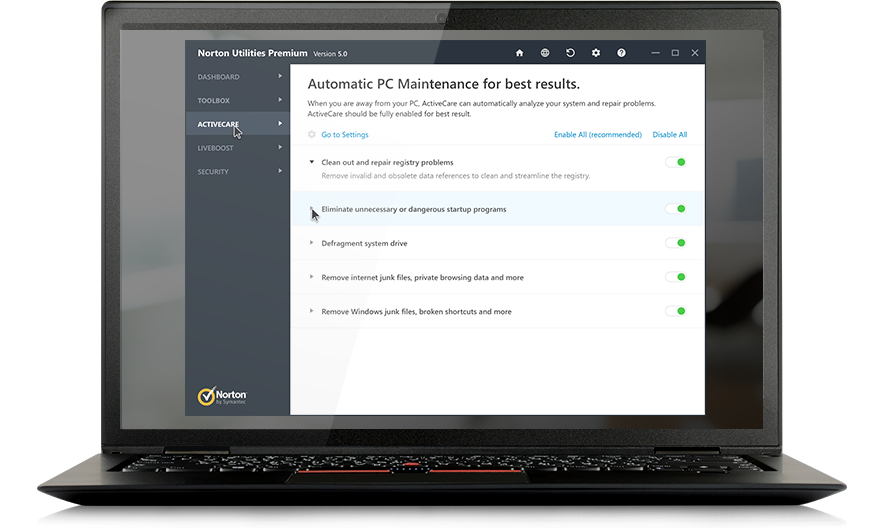
The Automatic Care feature in Norton Utilities Premium

This is a very important feature of Norton Utilities Premium, helps monitor your computer performance. The Automatic Care feature in Norton Utilities Premium monitors the key performance indicators of your computer. It works silently in the background to perform required repairs only when your computer is on but not in use. If you return to your computer during Automatic Care processing, you can either cancel the process or let it continue.